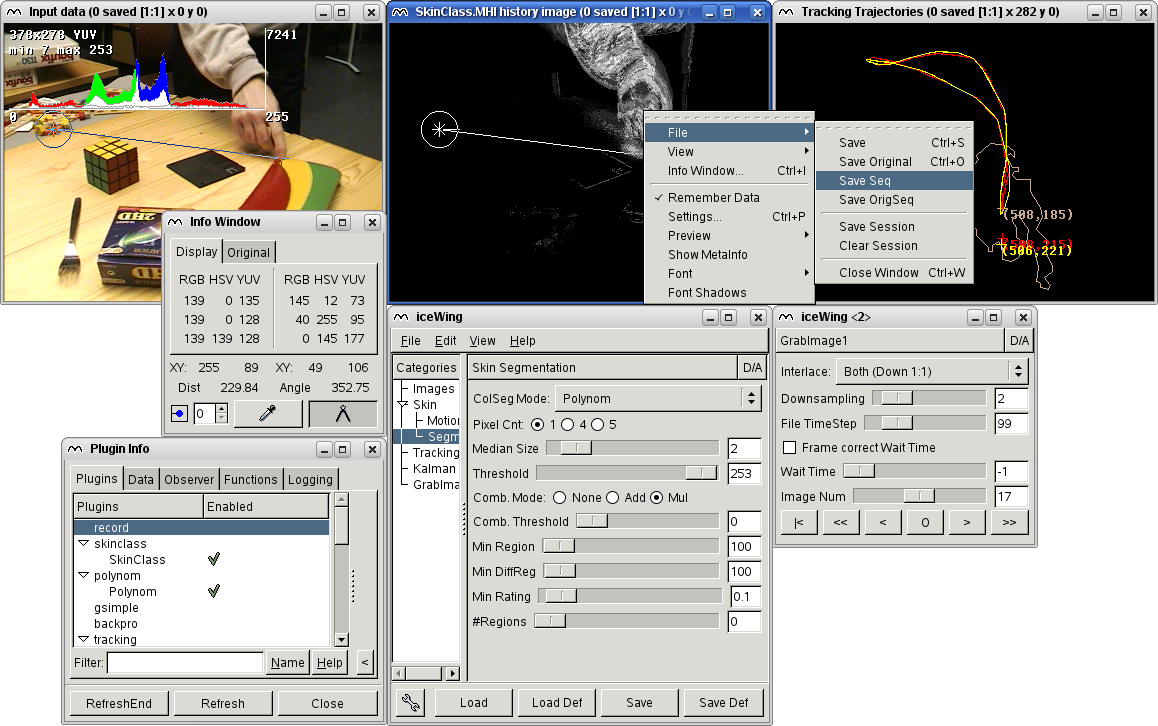
| Figure 9.1: | A typical session with iceWing. Various intermediate results are being displayed and could be examined. Various parameters can be influenced interactively. |
Originally taken from [Löm04, Anhang B]. Since then translated by Ilker Savas and updated according to changes in iceWing.
During developing software in science there are certain extensive tasks to do, which occur every time but do not belong to the real task directly. Very often one needs a way to influence the parameters of an algorithm easily and quickly. Similarly important is the possibility to easily visualize any data. It must be easy to examine and save the data at any time. In greater integrated systems it is advantageous, if the different components can be developed separately from each other without the loss of flexible and fast interaction with each other afterwards.
In science an ergonomically sophisticated graphical user interface, which can also be easily handled by a person not familiar with the program, is mostly not needed. In most cases it is important that a small team which is familiar with the task can easily develop and optimize its special algorithm. This team of specialists must be able to handle the user interface in an easy way. Thereby it is mostly not intended to develop a complete program for an end user. Several systems already offer functionality in these directions. For example the commercial program MATLAB offers comprehensive options for visualization and also for generation of graphical user interfaces, which can be used easily via the provided scripting language [The03]. The open script language Tcl with its graphical tool Tk offers also great facilities to generate user interfaces [Ous94].
But existing systems usually are not optimized for the specific needs during developing scientific software. iceWing, the Integrated Communication Environment Which Is Not Gesten1 was developed to account for this lack. iceWing is a graphical shell, which offers the above mentioned functionalities to dynamically loadable plugins in an easy way. In the next sections iceWing will be introduced more closely. First an overview of the structure of plugins is given. The following chapters then give more details of the various fields of iceWing in an exemplary manner. So this is not a complete reference manual which would describe all functions and types of iceWing. Further details not mentioned here can be found in the header files and example plugins of iceWing.
| Figure 9.1: | A typical session with iceWing. Various intermediate results are being displayed and could be examined. Various parameters can be influenced interactively. |
iceWing is a program written in the C language, which can dynamically load plugins realized as shared libraries. It was tested on i386 Linux with the compilers GCC Version 2.95 up to Version 4.72 and on Alpha’s with OSF 4.0f with the compilers DEC C Version 5.9 and GCC Version 3.1. For graphical outputs as well as the user interface generation the GTK toolkit3 Version 2.x or optionally Version 1.2 is used. With the help of other external libraries the functionality can be extended, for example towards supported graphical formats and supported cameras for grabbing images. Figure 9.1 demonstrates a typical session with iceWing in which hands in a sequence of images are segmented and tracked.
iceWing the program only provides an initial user interface and miscellaneous auxiliary routines. The real functionality is realized by the various plugins that may be plugged into iceWing. Plugins for iceWing must implement the interface shown in Figure 9.2. This is illustrated in Figure 9.3 with the help of a minimal plugin. The source code of this plugin as well as a Makefile to compile it can be found in the iceWing source distribution in the directory “plugins/min/”. When the plugin, i.e. the shared library, is first loaded, a function named plug_get_info() is invoked. This is also the only predetermined entry point in the library. This function is used to create a new instance of the plugin – it acts as a factory function. It returns a pointer to a filled structure of type plugDefinition.
| typedef struct plugDefinition { |
| char *name; |
| int abi_version; |
| void (*init) (struct plugDefinition *plug, |
| grabParameter *para, int argc, char **argv); |
| int (*init_options) (struct plugDefinition *plug); |
| void (*cleanup) (struct plugDefinition *plug); |
| BOOL (*process) (struct plugDefinition *plug, |
| char *id, struct plugData *data); |
| } plugDefinition; |
| Figure 9.2: | The structure plugDefinition, which every plugin must implement. |
The structure plugDefinition contains all the information iceWing needs for a new plugin. The function pointers init(), init_options(), cleanup(), and process() define entry points for the instance of the plugin. init() is used for the general initialization of an instance. For example it processes command line arguments for the plugin instance. In init_options() the graphical user interface is initialized. More details about the user interface initialization can be found in section 9.3. cleanup() is invoked at the end of the program to release any resources. Finally process() is called if the real functionality of the plugin is to be executed. When this invocation happens can be determined with the functions for the communication between plugins. For more details see section 9.2. The variable name declares the name of the instance. As the name serves as the identification of the instance it must be unique among all loaded plugins. abi_version should always be set to the constant PLUG_ABI_VERSION. During runtime it is used to check if the plugin was compiled against the correct iceWing version.
| #include "main/plugin.h" |
| static void min_init (plugDefinition *plug, |
| grabParameter *para, int argc, char **argv) |
| { |
| ... |
| } |
| ... |
| static plugDefinition plug_min = { |
| "Min", |
| PLUG_ABI_VERSION, |
| min_init, |
| min_init_options, |
| min_cleanup, |
| min_process |
| }; |
| plugDefinition *plug_get_info (int cnt, BOOL *append) |
| { |
| *append = TRUE; |
| return &plug_min; |
| } |
| Figure 9.3: | The principal structure of a minimal plugin. |
As the plugin in Figure 9.3 always gives a fixed name back it can be instantiated only one time. To change this the structure of type plugDefinition has to be allocated dynamically and the plugin name contained inside the structure must be made unique for each invocation. This can be achieved by integrating the instance number cnt into the name. cnt contains the number of calls to the function plug_get_info(). Thus plug_get_info() is modified to:
Now any number of instances of the plugin are possible.
Plugins in C++ can be realized in the same way as described above. Alternatively one can use the C++ class shown in figure 9.4. By deriving from this class the creation of a plugin instance is also possible. In this case the factory function plug_get_info() is modified to
where ICEWING::MinPlugin is a class derived from ICEWING::Plugin. A C++ variant of the “min” plugin can be found in the iceWing source distribution in the diretory “plugins/min_cxx/”.
| namespace ICEWING { |
| class Plugin : public plugDefinition { |
| public: |
| Plugin (char *name); |
| virtual ~Plugin() {}; |
| virtual void Init (grabParameter *para, int argc, char **argv) = 0; |
| virtual int InitOptions () = 0; |
| virtual bool Process (char *ident, plugData *data) = 0; |
| }; |
| } |
| Figure 9.4: | The class Plugin, which allows the creation of plugins in C++ in a manner suitable for C++. |
For simplified creation of new plugins a plugin generator is available: icewing-plugingen.
icewing-plugingen is a shell script which expects up to three arguments:
>
icewing-plugingen [-c|-cxx|-cpp] plugin-name short-name
If “-c” is given, which is as well the default, a new C-plugin of name “plugin-name” is
generated in the current directory. If “-cxx” or “-cpp” is given, a C++-Plugin deriving from
the class Plugin is created. For the C-Version function and type names in the generated
source start with “short-name”. Besides the needed sources for the plugin a Makefile is
generated and the plugin is directly compiled for immediate testing. The plugin is kept
short and simple, but shows already data observation, easy user interface generation, and
rendering of data in a window.
Within a main loop iceWing continuously invokes the loaded plugins. The order of the invocation can be determined by the plugins themselves. For this and for further communication of the plugins iceWing offers several facilities. Plugins can exchange data between each other. They can observe the storing of data by other plugins and they can make functions available to other plugins and invoke functions made available. Details about these communication possibilities will now be given.
In iceWing data consists of a string as an identifier, a reference counter and a pointer to the concrete data. This data element is deposited and made available for other plugins by the function
The function destroy() is invoked when the reference counter of the data has reached zero at the end of a main loop run. For access to data provided by other plugins there are the functions
With plug_data_set() one can store several data elements attached to one identifier. With the parameter data of plug_data_get() one can access them successively. If the value of this parameter is NULL then the data element first stored under the identifier is returned. When invoked again with the previously returned pointer the following data element is returned. If plug_data_get_new() is used only data elements stored since the start of the current main loop run are returned. Data elements stored during previous runs, which where not freed because of increased reference counts, are skipped. If plug_data_get_full() is used, the returned data elements can be additionally restricted to these elements, which were stored by a special plugin.
Every invocation of plug_data_get() or one of its variants increments the reference counter of the returned data element. Increasing the reference counter of data, to which a pointer is already available, can be done with the function
The references can be released with the function
Every successful call to plug_data_get() and every call to plug_data_ref() requires a succeeding call to plug_data_unget() to let the reference count drop again. Finally this leads to an automatic call to the destroy() function for releasing the data.
So far it is not clear when iceWing invokes the process() functions of the plugins. This is determined by the observation of data provided by other plugins. With the function
a plugin can observe the storage of data with the identifier ident. When new data with this identifier gets stored, the process() function of the observing plugin is invoked.
Data is considered new, if it is stored within the current main loop run. At the start of a main loop run iceWing stores pseudo data under the identifier "start". Every plugin that observes this data will be invoked at the start of every main loop run. These plugins can now store data themselves using their own identifiers to initiate the call of other plugins observing these identifiers. If there are no more plugins registered for the identifiers of newly stored data, the next main loop run is initiated by again storing pseudo data under the identifier "start". The different plugins are invoked sequentially. Only if the process() function of the previous plugin is finished the process() function of the next plugin is invoked. Even if there were multiple data elements stored under the same identifier the plugins are normally invoked only once. Plugins that should process all data elements stored under the same identifier must fetch them sequentially with plug_data_get().
This behavior can be changed with a special form for the variable ident. If "ident()" is given instead of "ident", the plugin is invoked separately for all available data elements of all plugins who’s identifier the plugin is observing. When "ident(plugin1 plugin2 ...)" is given, the plugin is invoked only for these plugins. The plugin is not invoked for data elements from other plugins. This is done by using the functionality of the function plug_add_default_page(). See page 149 for more details. If the function plug_add_default_page() is called additionally, any loaded default values for the plugin widget of plug_add_default_page() are ignored if "ident()" or "ident(plugin1 ...)" is used here. I.e. the dependency specifications from plug_observ_data() take precedence.
By invoking
a plugin can stop its observation of data with a certain identifier. Here, besides "ident" "ident()" and "ident(plugin1 plugin2 ...)" can be given for ident. "ident" only removes the observer. "ident()" removes the observer and any dependent plugins in the widget from plug_add_default_page() or a previous call to plug_observ_data() with a dependency specification. "ident(plugin1 plugin2 ...)" only removes the specified plugins. Only if no dependent plugins for "ident" remain, the observer is removed as well.
The communication method described in the last paragraph is purely data driven. Additionally there is the possibility for plugins to provide their functions to other plugins. This can be achieved with the function
Again with the help of the identifier ident a plugin can access the registered function by means of the function
Similar to data storing many functions can be registered under the same identifier. By setting func to NULL the first function registered under an identifier can be accessed. Consecutive calls to plug_function_get() with a previously returned pointer yields the successively registered function. With the function
a provided function can be withdrawn by the plugin which provided it.
The graphical abilities of iceWing can be divided into three groups. The first group incorporates functions for generating a user interface consisting of widgets. The second group contains functions for the display of various data. Furthermore there are functions not classifiable into one of these groups directly. The generation of the graphical interface mainly takes place in the init_options() function of each plugin. However, every function described in this chapter can be invoked at any later time as the user wishes. In the following sections these abilities will be now introduced.
Every widget that could be generated with iceWing functions follows the same philosophy. During the generation of the widget the address of a variable is passed to the generating function. This variable is modified in the background by iceWing, without the need of any help by the plugin. Indeed the plugin has no means to modify the variable directly. Besides this, the screen layout for the widgets is predetermined for the most part. This limitation yields two benefits:
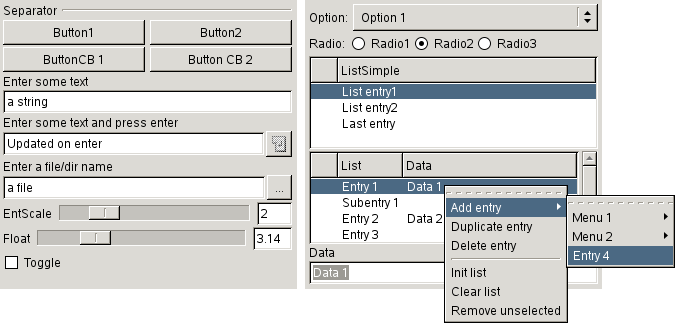
Figure 9.5 gives an overview of all widget types iceWing can create. The “demo” plugin, which was already used during the quicktour (see section 3.1), uses all these widgets and additionally gives an overview over different render capabilities of iceWing. It can be found in the iceWing source distribution in the diretory “plugins/demo/”.
Widgets can be created on every page on the main window of iceWing, in the context menu of display windows and in the “Settings” window of display windows. Figure 9.1 shows all these possible positions. A new page in the main window of iceWing can be created with the function
title denotes the name to be displayed in the “Categories” list. If title contains a period or a space (".", " "), the “Categories” list will be displayed in a tree structure. The return value of the function opts_page_append() is an index that has to be specified during the creation of a widget. The function
returns the index of the “Settings” window of display windows. This enables the creation of widgets in these windows.
Widgets can be created with different functions for the different widget types. The functions are all named according the pattern opts_<widgetname>_create(). Examples of functions for four different widget types are
The parameter list of the functions again follows always the same pattern. page denotes the page the widget should appear on. It can be the return value of the function opts_page_append() or prev_get_page(). Or, if the widget should be added to the context menu of a display window, it is the pointer to the corresponding prevBuffer. New widgets are always added at the bottom of the specified page.
title denotes the name of the widget. In the examples in figure 9.5 it was for example "Enter some text" for the string widget and "EntScale" for the integer slider. This name together with the page name has to be unique throughout the whole program as it is also used as the identifier of the widget itself. The resulting identifier is "pagetitle.widgettitle". With this identifier the widget is addressable at any later time. Alternatively, to create the same widget, page can be set to -1 and title to the complete identifier, i.e. "pagetitle.widgettitle".
If a widget with the identifier "pagetitle.widgettitle" already exists, the newly created widget replaces the old one. This allows to change any widget parameter or even any widget type at any time, for example the allowed range of values for a slider.
For entries in context menus of display windows submenus, default hotkeys, and stock icons can be specified. For example, the title "Region/Draw white <<control>w> <stock gtk-select-color>" will create a menu entry “Draw white” in the submenu “Region”, which will have “<control>w” as its hotkey and the stock icon “gtk-select-color” as its icon. The hotkey can be later changed by the user by pressing the desired new hotkey while the menu entry has the focus.
ttip specifies the tool tip of the widget. In value the address of a variable has to be given. This variable is modified by iceWing in the background in a dedicated thread. The plugin does not need to care about querying the widget and setting the variable. It can simply use the variable. The remaining parameters specify the valid values of the variable value.
Additionally it is possible to set the value of a widget at a later time and to delete a widget with the two functions
title denotes the identifier of a widget, i.e its page name followed by a “.” and by the widget title. Additionally, the title may contain the special characters ’?’ and ’*’. If the title can not be found directly and any of these characters are inside the title, pattern matching is performed to find the widget. Here ’?’ matches exactly one character and ’*’ matches any number of characters. In case of an integer the value to be set is passed directly in value, otherwise it is a pointer to the value to be set. For example to set the value of the widget "EntScale" on page "demo" in figure 9.5 to 3 one can use
whereas to set the "float" widget
must be used.
Sometimes it might be necessary to get the value of a widget where one does not have direct access to. For this the function
can be used, which returns a pointer to the current value from the widget referenced by title. See opts_value_set() above for more details about the title.
The current settings of all the different widgets created with one of the opts_<widgetname>_create() functions can be loaded and saved to/from files without any plugin interaction in the graphical user interface. See paragraph 4.3 for more details about these files. Sometimes it is desirable to not load or save some of these settings. This can be achieved with the functions
For both functions title denotes the identifier of the to be affected widget. The function opts_defvalue_remove() prevents, that settings from the configuration files, which are automatically loaded during the start of iceWing, are applied to the given widget. This function must be called before the corresponding opts_<widgetname>_create() call. Otherwise the settings were already applied. opts_save_remove() prevents that the settings are saved to any configuration files in the first place.
Normally, variables are simply modified by iceWing in the background in a dedicated thread without any needed interaction of a plugin. But iceWing can additionally call functions on value change or when a different signal for a widget occurs. This is achieved with the function
The function cback is called with data as last argument if one of the signals specified with sigset occurred for the widget referenced by title and page. See opts_<widgetname>_create() above for all the details about page and title. If connecting cback was possible opts_signal_connect() returns TRUE. Signal handlers are invoked in the order they where connected.
For the list widget the signal OPTS_SIG_CHANGED is emitted directly after changing the variable corresponding to the widget. newValue is NULL in this case. For all other widgets the signal OPTS_SIG_CHANGED is emitted just before the variable corresponding to the widget is changed by iceWing. value of widget still points to the old value. newValue is a pointer to the new value for the variable.
The automated treatment of variables of widgets for loading and saving can be extended to variables that don’t have a widget assigned. This is provided by the functions
title corresponds to the title variable of the widget functions. value specifies the address of the variable to be loaded and saved. With type their type is declared. If func is set to NULL then in addition to be saved automatically in the background the variable is also loaded and set automatically. Otherwise the function setval with the additional argument data gets invoked, if the variable should be modified. This function is then responsible for the modification of the variable. With the function opts_varstring_add() one can additionally specify a maximal length for a string, which will be not exceeded during the setting of the string.
There are certain standardized functions which are (a) controllable by widgets and (b) interesting for a lot of plugins. In addition most plugins need at least one page to place their widgets on. To simplify this there is the following function which creates a new page with two special widgets:
This function creates a new page in the main window of iceWing under the name ’plugDef->name" "suffix’ and returns its index. Furthermore up to two widgets are created whose functionalities are completely realized by iceWing. The first widget toggles the invocation of the process() function of the plugin. If PLUG_PAGE_NODISABLE is given in flags, this widget is suppressed.
The second widget is created if PLUG_PAGE_NOPLUG is not set in flags. With this widget one can control which data elements of which other plugins should be passed to the plugin plugDef. Normally the function process() of the plugin plugDef is invoked as soon as data with an identifier observed by plugDef is provided by any other plugin. Even though there could be more than one data element available under the observed identifier at the time the plugin is invoked only once. The plugin can get the remaining data elements by using the function plug_data_get().
With the function plug_add_default_page() this behavior is changed. If in this case nothing is entered in the second widget, the plugin is invoked separately for all available data elements of all plugins, who’s identifier the plugin is observing. When there are names of plugins in the widget, the plugin is invoked only for these plugins. The plugin is not invoked for data elements from other plugins.
Since this widget supplies iceWing with additional information about the interdependencies between the registered plugins, the order of invocation of the plugins can be changed accordingly if necessary. If multiple plugins observe the same identifier "ident" normally the order of their invocation is not determined. However, if in one plugin’s plug_add_default_page() widget is specified that the plugin want’s to get "ident" from one of these other plugins, then this other plugin is always invoked first. As an example suppose that plugins “A” and “B” both observe "image". If now the user specified in the widget of plugin “A” that “A” should get "image" from plugin “B”, plugin “B” is always invoked before plugin “A” if data of type "image" is available.
For easy creation of names of the form ’plugDef->name”suffix’ there is the function
which returns a pointer to a per-plugin-instance string of the form ’plugDef->name”suffix’. This often comes handy for accessing widgets on the page created for example by plug_add_default_page() but as well to create pages with opts_page_append() or to access widgets on these pages. All widget names in iceWing have to be unique. If these pages use this naming scheme as well, the names are easily made unique. The same is true for the function prev_new_window(), where this nameing scheme should be used as well.
Sometimes, plugins need to store additional data files. The function
returns an appropriate path where plug can store its data files. If the library the plugin was instantiated from was loaded from its default path, the function returns ${PREFIX}/share/iceWing, if it was loaded from the iceWing path in the users home directory ˜/.icewing/data is returned, and if the lib was loaded from one of the ICEWING_PLUGIN_PATH directories ${ICEWING_PLUGIN_PATH}/data is returned. See page 43 as well for the iceWing command line option “-l”, which loads plugin libraries.
iceWing offers various possibilities for data visualization. Plugins can create any number of data display windows. The user may at any time open and close these windows, scroll and zoom in them, save their contents or display meta informations about their content. During these actions vector objects like lines and ellipses get correctly redrawn at the desired zoom level. All these actions do not involve the plugins, since the display windows are managed completely by iceWing.
New windows can be created by the function
title is on the one hand the name of the window and on the other hand an identifier. This identifier together with the names of the pages created with opts_page_append() in the iceWing main window has to be unique throughout the whole program. If the name contains a period (".") the windows in the “Images” list in the main window will be displayed in a tree structure. width and height specify the initial size of the window. The user can resize the window at any time. Specifying -1 means that the default values for width and height are taken. gray determines if the content of the window is displayed in gray or in color. If show = TRUE the window is opened instantly after creation. Otherwise the user has to double-click on the window title in the “Images” list to open the window.
Bigger amounts of memory are used not before the window is opened the first time. Every drawing function of iceWing first tests if a window is actually open before drawing and returns immediately if this is not the case. So the consumption of computer resources stays low even if many windows are created and outputs in them are produced without any further checks. Sometimes it is useful to check whether a window is open before any complex computations of output data for the window is carried out. This can be done with (buffer->window != NULL). With
one can remove and free a window previously created with prev_new_window().
The user can scroll and zoom in the windows at any time. Additionally these actions can be performed by the plugin using the function
The content of window b is then displayed at location (x,y) with a zoom value of zoom. If any of the parameters are below zero, the respective old values are retained.
Some plugins need informations about mouse actions and key presses in a particular window. They can be retrieved with the functions
If one of the events specified by sigset occurs, which is triggered by a mouse button or a key press in window b, the function cback() with the additional argument data is invoked. cback() is additionally provided with the event occurred and further information about the event. The function prev_signal_connect() only enables the handling of mouse events whereas prev_signal_connect2() permits the handling of both mouse events as well as key press events. The effects of zooming and scrolling are completely removed from the passed mouse coordinates.
The display of graphical objects
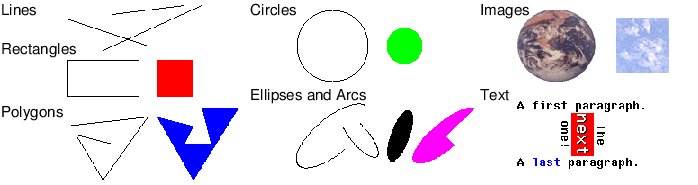
iceWing provides the possibility to display miscellaneous graphical primitives in the windows created by prev_new_window(). Figure 9.6 gives a summary of all primitives iceWing can create. The display of the objects is accomplished in multiple stages. The first step is optional and, if enabled, copies all of the original data which is needed for the display of an object. With this data iceWing can redraw the image without interaction with the plugin – scrolling and zooming in high quality gets possible without the plugins help. Subsequently the objects are displayed in an off-screen buffer using the current scroll and zoom values. This buffer contains the precise section of the image which will be seen in the window and hence can be used for redrawing the window - again without the involvement of the plugin. In a final step the buffer is then drawn into the window.
All objects can be displayed using different functions with a common interface. Two examples of these functions are
Every render function gets different standard arguments. Window b is the window in which the object is displayed. With width and height one can specify the total size of all objects which are still inside the window. These latter two values are needed to compute the correct zoom factor for the display of the object if the “Fit to window” display mode for the window is chosen. If these values are -1 or RENDER_CLEAR is not set in disp_mode, the last values for the buffer b are used instead. With disp_mode the rendering can be influenced. If RENDER_CLEAR is specified the contents of the whole window is cleared and the internal copies of all parameters of former drawing actions are freed before drawing. RENDER_THICK enables the rendering of thicker lines by means of a special setting. See the function prev_set_thickness() for more details. The remaining arguments specify the particular object, which should be displayed in the window. With prev_render_data() an arbitrary object can be displayed and prev_render_list() displays an array of objects of the same type. type specifies the type of the objects. data is in the first case a pointer to the data of one object and in the second case a pointer to the data of an array of objects. In the second case cnt gives the length of the array and size denotes the size of an array element.
Data for objects to be displayed must be specified via structures. For example for lines it is
The structures for the other available objects are similar. ctab determines how r, g and b should be interpreted. For example if ctab is set to IW_RGB then they are interpreted as a point in the RGB color space, with IW_YUV as a point in the YUV color space, or with a pointer to a color table r would be interpreted as an index in this color table. Specifying -1 for r, g, or b has a special meaning. In this case the corresponding color channel is not modified during the rendering. Finally x1, y1, x2 and y2 are the coordinates of the endpoints of the line. To enable subpixel accurate displaying of objects there are float data type variants of every vector object structure, for example prevDataLineF for lines. For displaying these data elements there are corresponding prevType values like PREV_LINE_F for lines.
To simplify the call to prev_render_list() there is a wrapper for every object type. For example arrays of lines or images can be displayed also using the functions
In image processing very often one needs to display an image. For the frequent case of 8 bit images there is the function
with which no structure has to be filled in this case. Additionally by setting RENDER_CLEAR this function clears the complete window before rendering the image. To render other types of images – iceWing also supports images of type 16 bit int, 32 bit int, float, and double – or to support other forms of flexibility the previously introduced function prev_render_imgs() or the different general render functions must be used.
For simplified text output there is additionally the function
This function invokes sprintf() internally and and renders the returned string. The string can contain additional formatting instructions to modify color, type and alignment of the rendering. For example by embedding <fg="255 0 0" bg="0 0 0" font=big> it can be switched to a big red font on a black background. Further details about the formatting instructions can be found in the header “Grender.h”.
The rendering of objects can be influenced further by the two functions:
prev_set_bg_color() determines with which color the window is cleared if RENDER_CLEAR is set. With prev_set_thickness() lines are drawn with the specified thickness if RENDER_THICK was set during the output of objects.
All functions for drawing objects introduced so far draw the objects incrementally in an off-screen buffer assigned to the appropriate window. In a final step this buffer can be rendered in the associated window using the function
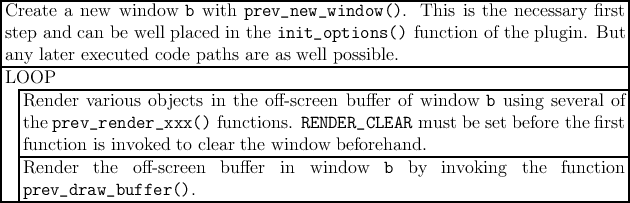
The steps to follow to render something in a window using iceWing can be summarized as:
 |
Besides this described interface with the prev_render_xxx() functions to render objects there is also another interface consisting of prev_drawXxx() functions. This is an interface with lower abstraction which for example ignores scroll positions as well as zoom adjustments. Because of this it should not be used most of the time. If this low level interface is necessary nevertheless, further details about its usage can be found in the according header files.
If the program has to be terminated this should never be managed using the regular ANSI function exit(). For this one should always use the function
The direct call to exit() can lead to a segmentation violation as well as to a freeze of the complete program. As various graphical abilities are realized in a dedicated seperate thread, an accurate synchronization with this thread has to be performed before termination. This synchronization is ensured by gui_exit().
In iceWing images are managed by the structure
In this structure image data can be stored in various types and arrangements. With iwType the type of data is specified ranging from 8 bit unsigned to double. The arrangement of the image data can be planed as well as interleaved. In a planed arrangement the color planes are provided separately in the fields data[0], data[1], …, data[planes-1]. In an interleaved arrangement data[0] contains all the color information where the particular color values of a pixel are juxtaposed in the array. For example for planes=3 in the RGB color space first the red color value of the first pixel is stored followed by the green and blue values. Subsequently the values of the second pixel are stored in the same way until finally the values of pixel width*height are reached and stored in data[0]. Images of all these types and arrangements can be created, released, loaded, saved, and also displayed.
There are several functions for managing images of which some of the important ones are:
Further details about these and several other functions for managing images can be found in the header file “Gimage.h”.
Besides the so far explained abilities iceWing has further functionalities in the graphics as well as in some other areas. In this section some of them will be introduced more closely where some others will not be detailed much. For example in the header file “output.h” there are functions to ease the use of DACS. These include functions for image output, for the output of status messages and for the output of general data via streams. Furthermore, it is possible to make functions available for RPC communication via DACS. All these functions manage the registration with DACS, the error handling and the generation of unique stream names and function names.
Further examples of useful functions include “session management” or functions that allow the registration of new graphical primitives that can then be used with the general rendering functions. Further details of these as well as the so far presented functions can be found in the appropriate header files of iceWing.
A central plugin is the in iceWing integrated plugin “grab”. It enables the import and the delivering of a series of images for further processing to other plugins. The images can be imported from a grabber (controlled by various drivers, e.g Video4Linux or FireWire), from DACS encoded in the Bild_t format, or from files of various pixel formats. Once “grab” is invoked by iceWing it imports the next image and makes it available for other plugins under the ident “image” using the function plug_data_set(). For the image the YUV color space is used. The structure that “grab” uses to provide the data is derived from iwImage, i.e. it first contains the image and afterwards different additional data. In detail, the structure is:
The image is allways encoded in the planed format, i.e. the color planes are provided separately in the fields data[0], data[1], …, data[planes-1] of the iwImage structure. Additionally the plugin can provide the imported images via a DACS stream in the Bild_t format. By means of a DACS-function the current or optionally also past images can be fetched from other programs in the Bild_t format.
If there is an observer for the identifier ’’imageRGB’’, then additionally the current image is provided in the RGB color space under this identifier using the function plug_data_set(). For the storing of the data associated with “imageRGB” again the grabImageData structure is used.
When a grabber is used to access the images, e.g. when the grabbing plugin was started with the option “-sg”, it is possible for every plugin to change at any time various parameters of the grabbing process. There are two possibilities to achieve this. The first option is to completely restart the grabbing process by changing the arguments, which where initially supplied to the “-sg” option. With this approach everything from section 4.2 can be specified and/or changed. This approach uses the GUI widget described in paragraph 5.2.3 to provide the options to the grabbing driver:
In this example the bayer argument is added to the first instance of the grabber plugin. If the bayer argument was specified previously, it is automatically removed on reinit of the grabbing process. If arguments are identical only the initial ones remain.
The second option allows to change single arguments on the fly, i.e. without a restart of the grabbing process. The disadvantage of this approach is that only some arguments of the grabbing plugin can be changed this way as the different grabbing drivers need special support for every argument. During initialization the grabbing plugin provides a function “setProperties” via plug_function_register() (see paragraph 9.2 for details about function exchange between plugins), which can be used to get or set different arguments at the same time. Here is an example which changes some arguments and prints the names of all properties of the current driver:
The header “grab_prop.h” contains all the details and more documentation about this approach.
“tools.h” provides several smaller auxiliary routines that are frequently needed during program development. These include functions for the output of errors, warnings, debug messages and functions for testing assertions:
All these functions invoke sprintf() internally. The functions iw_debug_xxx() and assert_xxx() only produce code if the macro IW_DEBUG is set during compilation. iw_debug_xxx() only produces output if the value of level is smaller than talklevel which can be chosen via the command line of iceWing (option “-t”, see page 34). iw_warning_xxx() always outputs its message, whereas iw_error_xxx() additionally terminates the execution of the program. The function variants without a number, i.e. iw_debug(), iw_warning(), iw_error(), and iw_assert(), allow an arbitrary number of arguments, but for full functionality they need either GCC or another compiler compatible with ANSI-C99. Otherwise these variants are implemented as functions instead of macros, which provide less information than the macro variants.
Additionally there are several functions for meassuring the execution time of program parts. Some of them are:
iw_time_add() creates a new timer and returns an index to it. Using this index it can be started with the function iw_time_start() and stopped with iw_time_stop(). With show = TRUE the passed time is printed to stdout immediately. Otherwise this is done after a certain number of iceWing main loop runs. With iw_time_add_static() the initialization can be simplified. With this function a new static variable named number is defined. This variable can be initialized by invoking iw_time_add() one time. An example usage scheme is:
The analysis of command line arguments can be simplified by the function:
This function tests if argv[*nr] occurs in pattern where pattern is scanned without case sensitivity. Subsequently *nr is incremented appropriately so that with the next invocation of iw_parse_args() the next argument can be analysed. The EBNF format of pattern is { "-" token ":" ch ["r"|"ro"|"i"|"io"|"f"|"fo"|"c"] " " }, where token is an arbitrary string without " " and ":" and ch is an arbitrary character. If -token is found, ch is returned by the function. The remaining optional characters in pattern define some modifiers. "r" specifies that an additional argument is needed which will be returned using the variable arg. "i" and "f" mean that an additional integer argument or float argument is needed, respectively. "c" specifies that token can be continued arbitrarily. This continuation is returned using the variable arg. Finally "o" denotes, that the string, integer, or float argument is optional. The application of iw_parse_args() is best explained using an example:
To ease interfacing with the OpenCV computer vision library [Int05] there are some auxiliary functions in the header file “opencv.h” in the “tools” directory. The functions from this file only work if the plugin which calls these functions links against the OpenCV libraries. Otherwise a needed symbol from the OpenCV libraries can not be resolved.
OpenCV uses the IplImage structure for image representation. To convert to and from the iceWing iwImage type the three functions
can be used. All these functions first allocate a new image and then copy the provided image to the newly allocated image. To free the returned image the functions cvReleaseImage() for IplImage images and iw_img_free (image, IW_IMG_FREE_ALL) for iwImage images must be used. With the flag swapRB on the fly conversion between RGB and BGR can be performed. If this flag is set to TRUE, the planes 0 and 2 are swapped during conversion.
To display IplImage images in a preview window the function
is available. The function clears the buffer by using RENDER_CLEAR and subsequently displays img in b with the color transformation ctab. This function does not create a new copy of the image and thus is as fast as the iceWing “native” render functions prev_render() and prev_render_imgs(). Remember that you must use prev_draw_buffer() to finally see the result on the screen.
Since version 2.0 OpenCV uses cv::Mat as it’s main type for images. For conversion to/from this type and for displaying this type without intermediate conversion to IplImage there are additionally the functions
Besides the different type these functions are identical to the IplImage based functions with the same name.